How to Number Rows Automatically in Google Sheets
Typing 1, 2, 3 by hand is fine until you insert or delete a row and the whole column is wrong. A formula-based number list renumbers itself automatically, so it always stays in order. Here are the best ways to do it.
The ROW function
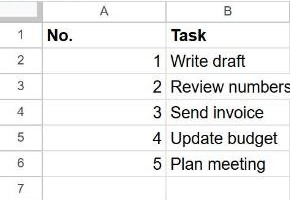
ROW returns the row number of a cell. If your data starts in row 2 (row 1 is the header), put this in A2:
=ROW()-1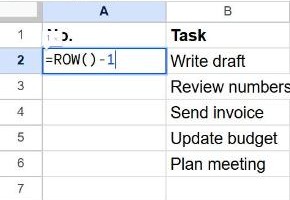
Copy it down the column. Because the number comes from the row position, deleting or inserting rows renumbers everything instantly.
Only number rows that have data
A plain =ROW()-1 shows a number even on empty rows. To leave blank rows blank, check the neighbouring cell first:
=IF(B2="", "", ROW()-1)Number a whole column at once with SEQUENCE
Instead of copying a formula down, one SEQUENCE formula can fill the whole list. In A2:
=SEQUENCE(COUNTA(B2:B))COUNTA(B2:B) counts how many rows have data in column B, and SEQUENCE produces 1, 2, 3… up to that number. Add rows to column B and the numbering grows on its own.
The quick autofill way (no formula)
If you don't need it to update automatically:
- Type
1in the first cell and2in the one below. - Select both cells.
- Drag the small blue square at the bottom-right corner down the column. Sheets continues 3, 4, 5…
Difference: autofill writes fixed numbers, so they don't renumber when you delete a row. Use a formula if the list changes often.
Frequently asked questions
How do I restart numbering partway down?
Subtract the row above your new start. If a new section starts in row 10, use =ROW()-9 from there.
Why does my number column sort wrongly?
ROW numbers follow the row position, so after sorting they stay 1, 2, 3 from the top, which is usually what you want. If you need a number that travels with the row, use autofill (fixed numbers) instead.
Can I add a label like "Item 1"?
Yes: ="Item "&(ROW()-1) produces Item 1, Item 2, and so on.