How to Change Text to Uppercase or Lowercase in Google Sheets
Imported data is often a mess of capitals: "ANNA SMITH", "anna smith", "aNNa SMITH". Three small functions fix all of it. Unlike some programs, Google Sheets has no menu button for case, so you use a formula.
The three case functions
| Function | Turns "anna smith" into |
|---|---|
=UPPER(A2) | ANNA SMITH |
=LOWER(A2) | anna smith |
=PROPER(A2) | Anna Smith |
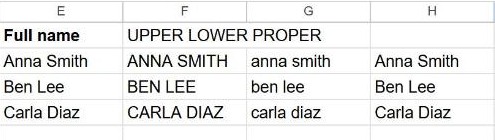
PROPER capitalizes the first letter of every word, which is perfect for names and titles. UPPER and LOWER make everything one case.
Replace the original with the fixed text
The functions create a new cell; they don't change the original. To keep only the cleaned version:
- Write the formula in an empty column, for example
=PROPER(A2), and copy it down. - Select those results and copy them (Ctrl + C).
- Select the original column and use Edit → Paste special → Values only (Ctrl + Shift + V).
- Delete the helper column.
Watch out with PROPER
PROPER capitalizes after every space and punctuation mark, which isn't always right:
- "mcdonald" becomes "Mcdonald", not "McDonald".
- "o'brien" becomes "O'Brien" (usually fine).
- Email addresses get capitalized, so don't run PROPER on them.
For exceptions, fix the few odd ones by hand after applying PROPER.
Capitalize only the first letter of a sentence
PROPER capitalizes every word. To capitalize just the first letter and lower-case the rest, combine UPPER, LEFT and LOWER:
=UPPER(LEFT(A2,1))&LOWER(MID(A2,2,LEN(A2)))Frequently asked questions
Is there a menu or shortcut for changing case?
No. Google Sheets only changes case with UPPER, LOWER or PROPER. (Google Docs has a Format menu option, but Sheets does not.)
How do I change case without a helper column?
You can't do it in place with a formula, because a cell can't rewrite itself. Use the copy → Paste special → Values only method above.
Does changing case affect numbers or dates?
No. UPPER, LOWER and PROPER only affect letters. Numbers and dates pass through unchanged, though they become text, so don't run them on cells you'll do math with.