How to Use Find and Replace in Google Sheets
Find and replace swaps one piece of text for another everywhere it appears, all at once. It's how you fix a misspelled name in 200 rows, change "St" to "Street", or clean up imported data, without editing each cell by hand.
Open Find and replace
Press Ctrl + H (Windows) or ⌘ + Shift + H (Mac). You can also go to Edit → Find and replace.
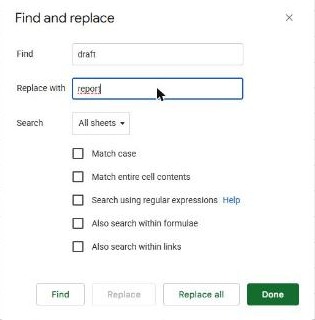
Replace step by step
- Type what you're looking for in Find.
- Type the new text in Replace with. Leave it empty to delete the found text.
- Set Search to All sheets, This sheet or Specific range.
- Click Replace all to change every match at once, or Find and then Replace to review one at a time.
The options explained
| Option | What it does |
|---|---|
| Match case | "cat" won't match "Cat". Leave off to ignore capitalization. |
| Match entire cell contents | Only replaces cells that contain exactly the search text, nothing more. |
| Search using regular expressions | Lets you search with patterns (see below). |
| Also search within formulas (formulae in UK English) | Looks inside formulas, not just their results. Useful for changing a range in many formulas. |
Handy regular-expression examples
Tick Search using regular expressions first, then:
| Find | Matches |
|---|---|
\s+$ | Trailing spaces at the end of a cell |
^\s+ | Spaces at the start of a cell |
\d+ | Any run of digits |
-|/ | A hyphen or a slash |
Careful with Replace all: it can't be undone selectively. Press Ctrl + Z right away if the result isn't what you expected, or narrow the search to a range first.
Just finding (not replacing)
To only search, press Ctrl + F. A small box appears; type your text and use the arrows to jump between matches.
Frequently asked questions
How do I remove all spaces from a column?
For extra spaces at the start and end, use Data → Data cleanup → Trim whitespace. To remove every space, open Find and replace, put a single space in Find, leave Replace with empty, and click Replace all.
Can I replace line breaks?
Yes, with regular expressions on: search for \n and replace with a space.
Why does "Replace all" say 0 changes?
Check Match case and the Search scope. Extra spaces or a wrong sheet selection are the usual causes.