How to Calculate Days Between Dates in Google Sheets
Dates in Google Sheets are stored as numbers (one per day), so the difference between two dates is simply one minus the other. For working days, months or years there are dedicated functions. Here's which one to use.
Days between two dates
With the start date in B2 and the end date in C2:
=C2-B2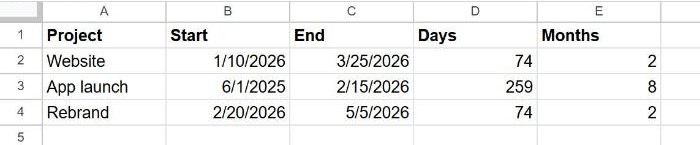
The DAYS function does the same thing, with the end date first:
=DAYS(C2, B2)Seeing a date instead of a number? Sheets sometimes copies the date format to the result. Select the cell and choose Format → Number → Number (or Automatic).
Include both the start and end day
=C2-B2 counts the nights between two dates. If a booking runs from Monday to Wednesday and you want to count 3 days, add 1:
=C2-B2+1Working days only
NETWORKDAYS counts Monday to Friday, including both the start and end date:
=NETWORKDAYS(B2, C2)To skip public holidays too, list them in a range and add it as the third argument:
=NETWORKDAYS(B2, C2, H2:H10)If your weekend isn't Saturday and Sunday, use NETWORKDAYS.INTL, which lets you choose the weekend days.
Months or years between dates: DATEDIF
=DATEDIF(start_date, end_date, unit)| Unit | Returns |
|---|---|
"D" | Total days |
"M" | Complete months |
"Y" | Complete years |
"YM" | Months left over after the complete years |
"MD" | Days left over after the complete months |
The start date must come first. If it's later than the end date, DATEDIF returns an error.
Calculate someone's age
With a date of birth in A2, TODAY() gives today's date, so:
=DATEDIF(A2, TODAY(), "Y")For "30 years, 4 months", combine two DATEDIFs:
=DATEDIF(A2, TODAY(), "Y")&" years, "&DATEDIF(A2, TODAY(), "YM")&" months"Days until a deadline
=C2-TODAY()A negative result means the date has passed. Combine it with IF to show a label: =IF(C2<TODAY(), "Overdue", C2-TODAY()&" days left").
Frequently asked questions
Why do I get #VALUE!?
One of the cells contains text that looks like a date but isn't one. Real dates are aligned to the right by default. Retype the date, or convert it with =DATEVALUE(B2).
Why is the result off by a day?
Decide whether you want to count the start day. Subtraction doesn't include it; add 1 if you need it.